Parameters
Use parameters in Cypher queries, card titles, descriptions, and Markdown text. When the parameter value changes, the displayed text updates automatically.
The parameters drawer lets you adjust values that shape your dashboard results.
Open the parameters drawer using the open the parameters drawer curly brackets icon {} on the top right of a dashboard.
-
Default value: The default value if there is no initial current value. It is not required.
-
Current value: The current value is used even if there is a default value.
Parameters drawer
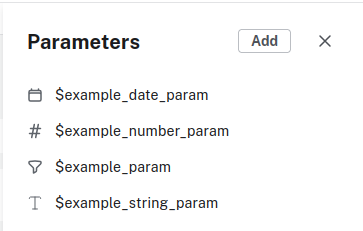
The drawer shows the dashboard parameters in alphabetical order. Each parameter has an icon next to it hinting at its data type:
-
A text icon for strings.
-
A toggle icon for boolean.
-
A hashtag icon for numbers.
-
A calendar icon for dates.
-
A filter icon for unspecified data types.
Creating a parameter in the parameter drawer
-
From the Parameters drawer, use the Add button.
-
In the dialog, enter a parameter name, select a data type and optionally an initial value for the parameter, then Save.