GROUP BYCypher 25 onlyIntroduced in Neo4j 2026.07
GROUP BY is a subclause that gives explicit control over the grouping keys of a RETURN or WITH clause.
If no GROUP BY clause is present, Cypher® uses implicit grouping:
If you use an aggregation function, all non-aggregated columns automatically become grouping keys.
Cypher’s GROUP BY is similar to SQL’s GROUP BY.
It arranges identically structured data into groups based on one or more grouping keys.
For this reason, it combines well with aggregate functions like count() or avg() to perform calculations on each group of data.
Grouping keys
The following rules apply to grouping keys:
-
A single grouping key or multiple grouping keys are possible
-
The set of grouping keys may be empty (
GROUP BY ()) -
GROUP BY ALLmakes every non-aggregating return item a grouping key -
If a projection clause contains a
GROUP BYclause, then every projection item must be:-
A leaf, that is:
-
An aggregation function like
sum(x) -
A constant like
0.1 -
A parameter like
$param -
A local variable like the
xincount(*) + size([x IN range(1,10) | x ]) -
A grouping key expression, that is a projected expression that doesn’t contain an aggregation function
-
-
A sub-expression, where all operands are either a leaf or a sub-expression
-
An exact grouping key, equal to a grouping key expression
-
-
Grouping keys which are not also return items are not projected to the output
Example graph
The following graph is used for the examples below:
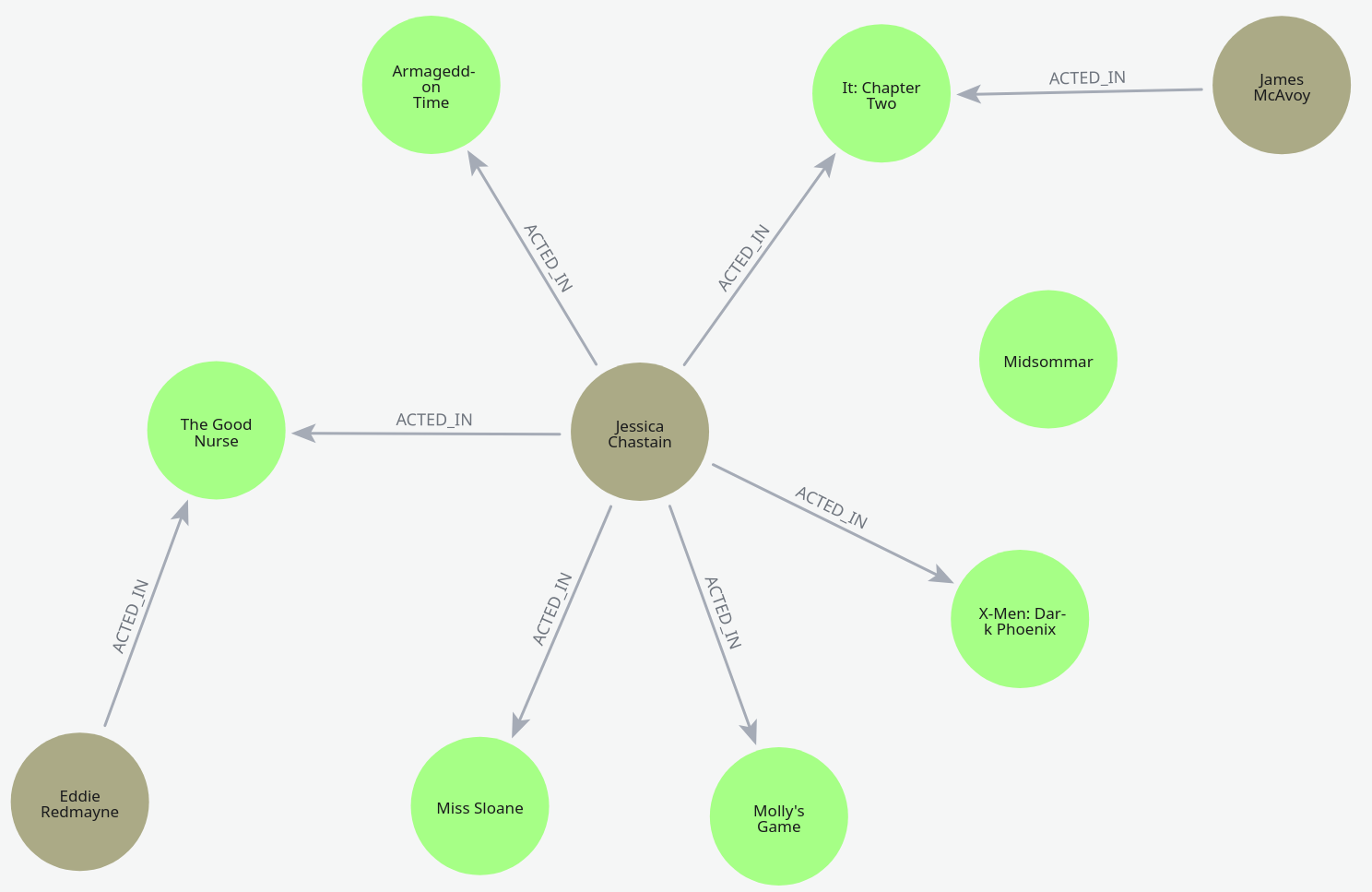
To recreate it, run the following query against an empty Neo4j database:
CREATE
  (jessica:Person {name: 'Jessica Chastain'}),
  (james:Person {name: 'James McAvoy'}),
  (eddie:Person {name: 'Eddie Redmayne'}),
  (missSloane:Movie {title: 'Miss Sloane', genre: 'Drama', rating: 4.5, year: 2016}),
  (mollysGame:Movie {title: "Molly's Game", genre: 'Drama', rating: 4.4, year: 2017}),
  (darkPhoenix:Movie {title: 'X-Men: Dark Phoenix', genre: 'Action', rating: 3.5, year: 2019}),
  (it2:Movie {title: 'It: Chapter Two', genre: 'Horror', rating: 3.6, year: 2019}),
  (midsommar:Movie {title: 'Midsommar', genre: 'Horror', rating: 3.6, year: 2019}),
  (armageddon:Movie {title: 'Armageddon Time', genre: 'Drama', rating: 3.8, year: 2022}),
  (goodnurse:Movie {title: 'The Good Nurse', genre: 'Drama', rating: 4.2, year: 2022}),
  (jessica)-[:ACTED_IN {role: 'Madeline Elizabeth Sloane'}]->(missSloane),
  (jessica)-[:ACTED_IN {role: 'Molly Bloom'}]->(mollysGame),
  (jessica)-[:ACTED_IN {role: 'Vuk'}]->(darkPhoenix),
  (jessica)-[:ACTED_IN {role: 'Beverly Marsh'}]->(it2),
  (jessica)-[:ACTED_IN {role: 'Maryanne Trump'}]->(armageddon),
  (jessica)-[:ACTED_IN {role: 'Amy Loughren'}]->(goodnurse),
  (james)-[:ACTED_IN {role: 'Bill Denbrough'}]->(it2),
  (eddie)-[:ACTED_IN {role: 'CHarlie Cullen'}]->(goodnurse)
GROUP BY clause template
GROUP BY in a RETURN clauseRETURN <return statement body>
GROUP BY { <grouping element> {, <grouping element> } … | () | ALL }
<order by and page clause>GROUP BY in a WITH clauseWITH <return statement body>
GROUP BY { <grouping element> {, <grouping element> } … | () | ALL }
[<order by and page clause>]
[<where clause>]Basic examples
GROUP BY with a single grouping keyMATCH (m:Movie)
RETURN m.genre AS genre, avg(m.rating) AS averageRating
GROUP BY genre| genre | averageRating |
|---|---|
|
|
|
|
|
|
Rows: 3 |
|
The movies are grouped by genre and the average rating for each genre is calculated.
The four drama movies have an average rating of 4.225.
GROUP BY with two grouping keysMATCH (p:Person)-[:ACTED_IN]->(m:Movie)
RETURN p.name AS actor_name, m.genre AS genre, avg(m.rating) AS averageRating
GROUP BY actor_name, genre| actor_name | genre | averageRating |
|---|---|---|
|
|
|
|
|
|
|
|
|
|
|
|
|
|
|
Rows: 5 |
||
Grouping by actor and genre, the drama and horror movies have two entries each.
GROUP BY with no grouping keysMATCH (m:Movie)
RETURN collect(m.title) AS movieTitles, avg(m.rating) AS globalAverageRating
GROUP BY ()| movieTitles | globalAverageRating |
|---|---|
|
|
Rows: 1 |
|
When using GROUP BY with (), you explicitly state that there are no grouping keys.
This means that there can be no direct projections of returned entities.
However, aggregations still work like in the showcased query.
GROUP BY ALLMATCH (p:Person)-[:ACTED_IN]->(m:Movie)
RETURN p.name AS actor_name, m.genre AS genre, m.year AS year, avg(m.rating) AS averageRating
GROUP BY ALL| actor_name | genre | year | averageRating |
|---|---|---|---|
|
|
|
|
|
|
|
|
|
|
|
|
|
|
|
|
|
|
|
|
|
|
|
|
|
|
|
|
Rows: 7 |
|||
GROUP BY ALL uses all projected expressions as grouping keys.
In this case, only the two drama movies from 2022 starring Jessica Chastain actually calculate an average from two values.
GROUP BY and ORDER BY
GROUP BY and ORDER BY can be used in the same query.
GROUP BY takes precedence and the query result can then be ordered by a subsequent ORDER BY clause.
GROUP BY and ORDER BYMATCH (p:Person)-[:ACTED_IN]->(m:Movie)
RETURN p.name AS actor_name, m.genre AS genre, avg(m.rating) AS averageRating
GROUP BY actor_name, genre
ORDER BY genre| actor_name | genre | averageRating |
|---|---|---|
|
|
|
|
|
|
|
|
|
|
|
|
|
|
|
Rows: 5 |
||
The results are ordered by genre after being grouped.
|
Neo4j 2026.07 features changes to the visibility of expressions in Variables named with |
Special cases
There are some special cases for GROUP BY:
-
GROUP BYcan be used without aggregation. -
You can group by both aliased and unaliased return items.
-
You can group by an item that is not returned.
GROUP BY without aggregationMATCH (m: Movie)
RETURN m.year AS year, m.rating AS rating
GROUP BY year, rating| year | rating |
|---|---|
|
|
|
|
|
|
|
|
|
|
|
|
Rows: 6 |
|
In this query, GROUP BY is equivalent to using the DISTINCT keyword.
Two movies with a rating of 3.6 exist for the year 2019, but the entry is not repeated.
GROUP BY and aliasingMATCH (m: Movie)
LET year = m.year
RETURN year, m.rating AS rating
GROUP BY year, rating| year | rating |
|---|---|
|
|
|
|
|
|
|
|
|
|
|
|
Rows: 6 |
|
You can group by aliased and unaliased return items (year is not aliased, rating is aliased).
GROUP BY an item that is not returnedMATCH (m: Movie)
LET title = m.title
RETURN m.year AS year, m.rating AS rating
GROUP BY title, year, rating| year | rating |
|---|---|
|
|
|
|
|
|
|
|
|
|
|
|
|
|
Rows: 7 |
|
title is not returned, but still used as a grouping key.
Without it, the result for 2019 with a rating of 3.6 would not be repeated.
Errors
GROUP BYMATCH (m:Movie)
LET title = m.title
RETURN m.rating AS rating, avg(m.rating) AS avg_rating
GROUP BY title42I18: error: syntax error or access rule violation - reference to non-grouping sub-expression. The expression contains a non-grouping sub-expression 42001: error: syntax error or access rule violation - invalid syntax |
m in m.rating AS rating is not a grouping key since it is not listed in the GROUP BY clause.
For more examples of aggregation errors, see Aggregation expressions and grouping keys → Examples.
MATCH (p:Person)-[:ACTED_IN]->(m:Movie)
RETURN p AS person
GROUP BY person
ORDER BY m.year;42N44: error: syntax error or access rule violation - inaccessible variable. It is not possible to access the variable 42001: error: syntax error or access rule violation - invalid syntax |
ORDER BY cannot access m because it has been declared before the RETURN clause and the query contains a GROUP BY clause.
For another example, see the last error described in Ordering aggregated or DISTINCT results.
GROUP BY with ambiguous references in grouping elementsMATCH (m)
RETURN m AS a
GROUP BY a.year42I80: error: syntax error or access rule violation - invalid grouping element. The grouping element 'a.year' is not a valid grouping key. A grouping element that references the projection item alias 42001: error: syntax error or access rule violation - invalid syntax |
a.year cannot be used as a grouping key because the property access cannot be resolved.
Syntax
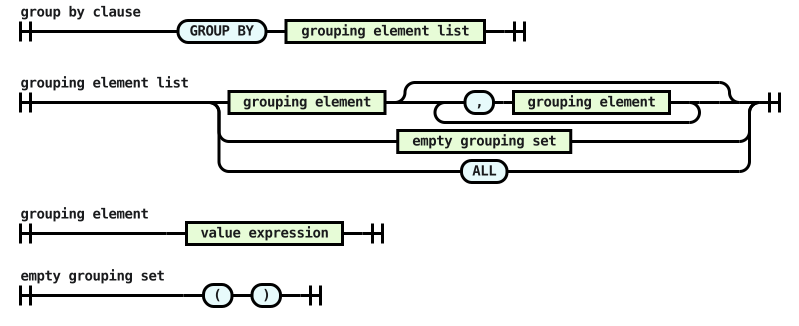
<group by clause> ::= "GROUP BY" <grouping element list>
<grouping element list> ::= <grouping element> [{ "," <grouping element> }...]| <empty grouping set> | "ALL"
<grouping element> ::= <value expression>
<empty grouping set> ::= "(" ")"
Railroad diagram of the snippet