CREATE
The CREATE clause allows you to create nodes and relationships.
To define these entities, CREATE uses a syntax similar to that of MATCH.
However, while patterns only need to evaluate to either true or false, the syntax for CREATE needs to specify exactly what nodes and relationships to create.
Unlike MERGE, which first checks for a match and only creates anything if nothing is found, CREATE always creates the given pattern, regardless of whether matching patterns exist.
For more information, see Comparing CREATE and MERGE below.
Create nodes
The CREATE clause allows you to create one or more nodes.
Each node can be assigned labels and properties.
You can bind each node to a variable that you can refer to later in the query.
Multiple labels are separated by colons.
CREATE (charlie:Person:Actor {name: 'Charlie Sheen'}), (oliver:Person:Director {name: 'Oliver Stone'})Multiple labels can also be separated by an ampersand &, in the same manner as it is used in label expressions.
Separation by colon : and ampersand & cannot be mixed in the same clause.
CREATE (charlie:Person&Actor {name: 'Charlie Sheen'}), (oliver:Person&Director {name: 'Oliver Stone'})Both of the above queries create two nodes, bound to the variables charlie and oliver, each with a Person label and a name property.
The node representing Charlie Sheen also has the label Actor while the node representing Oliver Stone is assigned the label Director.
Create relationships
Relationships can also be created using the CREATE clause.
Unlike nodes, relationships always need exactly one relationship type and a direction.
Similar to nodes, relationships can be assigned properties and relationship types and be bound to variables.
CREATE (charlie:Person:Actor {name: 'Charlie Sheen'})-[:ACTED_IN {role: 'Bud Fox'}]->(wallStreet:Movie {title: 'Wall Street'})<-[:DIRECTED]-(oliver:Person:Director {name: 'Oliver Stone'})This query creates the Person nodes for Charlie Sheen and Oliver Stone and the Movie node for Wall Street.
It also created the relationships of the types ACTED_IN and DIRECTED between them.
Comparing CREATE and MERGE
CREATE and MERGE are both used to add nodes and relationships to the graph, but they differ in how they handle existing data.
CREATE unconditionally creates a new node or relationship, without checking whether a matching one already exists.
Running the same CREATE statement multiple times will therefore produce duplicate entries.
CREATE statements will create two separate but identical entitiesCREATE (:Person {name: "Alice"})
CREATE (:Person {name: "Alice"})CREATE does not check for existing matches, so it will create duplicates unless a uniqueness constraint or key constraint prevents it.
With a uniqueness constraint on :Person(name), the second CREATE statement above would fail instead.
MERGE first attempts to match an existing pattern in the graph.
If a match is found, it uses the existing node or relationship; if not, it creates a new one.
This makes MERGE idempotent; running it repeatedly with the same pattern will not create duplicates.
MERGE statements will result in only one entity, as the second matches the firstMERGE (:Person {name: "John"})
MERGE (:Person {name: "John"})CREATE |
MERGE |
|
|---|---|---|
Duplicates |
Always creates new data. |
Creates only if no match exists; safe for incremental imports and re-runs. |
Performance |
Fast — no lookup required. |
Requires a lookup per row; without an index, this means a full label scan for every row. |
Best for |
|
|
Reusing variables
The previous example created a path between the specified nodes. Note, that these newly created nodes and relationships are not connected to what was previously in the graph. To connect them to already existing data, bind the desired nodes and relationships to variables. These variables can then be passed along to subsequent clauses in a query that target pre-existing elements in the graph.
MATCH (charlie:Person {name: 'Charlie Sheen'}), (oliver:Person {name: 'Oliver Stone'})
CREATE (charlie)-[:ACTED_IN {role: 'Bud Fox'}]->(wallStreet:Movie {title: 'Wall Street'})<-[:DIRECTED]-(oliver)
In this example, the MATCH clause finds the nodes Charlie Sheen and Oliver Stone and binds them to the charlie and oliver variables respectively.
These variables are then passed along to the subsequent CREATE clause, which creates new relationships from the bound nodes.
You can also reuse variables from the same CREATE, both in the same or a later clause.
This way, you can, for example, define constructs that are more complex than just a linear path.
CREATE p = (charlie:Person:Actor {name: 'Charlie Sheen'})-[:ACTED_IN {role: 'Bud Fox'}]->(wallStreet:Movie {title: 'Wall Street'})<-[:DIRECTED]-(oliver:Person:Director {name: 'Oliver Stone'}), (wallStreet)<-[:ACTED_IN {role: 'Gordon Gekko'}]-(michael:Person:Actor {name: 'Michael Douglas'})
RETURN length(p)
Creates all three nodes for Charlie Sheen, Oliver Stone and Michael Douglas and connects them all to the node representing the Wall Street movie. It then returns the length of the path from Charlie Sheen to Oliver Stone.
Note that when repeating a node’s variable, you may not add labels or properties to the repetition.
MATCH (charlie:Person {name: 'Charlie Sheen'})
CREATE (charlie:Actor)
This query will fail because the variable charlie has already been bound to a pre-existing node, and therefore it cannot be reused to create a new node.
If you intend to add a label, use the SET clause instead.
Reusing variables in properties
The value that can be assigned to a node’s or a relationship’s property can be defined by an expression.
MATCH (person:Person)
  WHERE person.name IS NOT NULL
CREATE (anotherPerson:Person {name: person.name, age: $age})
This example created a Person node with the same name as another person and the age from a parameter called age.
Such an expression may not contain a reference to a variable that is defined in the same CREATE statement.
This is to ensure that the value of a property is always clear.
CREATE (charlie {score: oliver.score + 1}), (oliver {score: charlie.score + 1})This query tries to create nodes such that Charlie’s score is higher than Oliver’s and vice versa, which is a contradiction. The query therefore fails.
Use parameters with CREATE
Create node with a parameter for the properties
You can also create a graph entity from a map.
All the key/value pairs in the map will be set as properties on the created relationship or node.
In this case we add a Person label to the node as well.
{
  "props": {
    "name": "Andy",
    "position": "Developer"
  }
}CREATE (n:Person $props)
RETURN n| n |
|---|
|
Rows: 1 |
Create multiple nodes with a parameter for their properties
By providing Cypher® an array of maps, it will create a node for each map.
{
  "props": [ {
    "name": "Andy",
    "position": "Developer"
  }, {
    "name": "Michael",
    "position": "Developer"
  } ]
}UNWIND $props AS map
CREATE (n)
SET n = map
|
Rows: 0 |
Create using dynamic node labels and relationship types
Node labels and relationship types can be referenced dynamically in expressions, parameters, and variables when creating nodes and relationships. This allows for more flexible queries and mitigates the risk of Cypher injection. (For more information about Cypher injection, see Neo4j Knowledge Base → Protecting against Cypher injection).
CREATE (n:$(<expr>))
CREATE ()-[r:$(<expr>)]->()
The expression must evaluate to a STRING NOT NULL | LIST<STRING NOT NULL> NOT NULL value.
Using a LIST<STRING> with more than one item when creating a relationship using dynamic relationship types will fail.
This is because a relationship can only have exactly one type.
{
  "nodeLabels": ["Person", "Director"],
  "relType": "DIRECTED",
  "movies": ["Ladybird", "Little Women", "Barbie"]
}CREATE (greta:$($nodeLabels) {name: 'Greta Gerwig'})
WITH greta
UNWIND $movies AS movieTitle
CREATE (greta)-[rel:$($relType)]->(m:Movie {title: movieTitle})
RETURN greta.name AS name, labels(greta) AS labels, type(rel) AS relType, collect(m.title) AS movies| name | labels | relType | movies |
|---|---|---|---|
|
|
|
|
Rows: 1 |
|||
INSERT as a synonym of CREATE
INSERT can be used as a synonym to CREATE for creating nodes and relationships, and was introduced as part of Cypher’s GQL conformance.
However, INSERT requires that multiple labels are separated by an ampersand & and not by colon :.
Additionally, INSERT does not support using dynamic node labels and relationship types.
INSERT (tom:Person&Actor&Director {name: 'Tom Hanks'})Creates a node, bound to the variable tom, with the labels Person, Actor, and Director and a name property.
CREATE and concurrent transactions
Checking whether a node or relationship already exists before running CREATE does not prevent duplicates under concurrent transactions: concurrent transactions can each perform the check, find no existing node or relationship, and proceed to create identical entities.
To reliably create an entity only if it does not already exist, use MERGE instead, combined with a uniqueness constraint on the merged property when merging nodes (this forces an index lock), or with both endpoint nodes bound by a preceding MATCH when merging relationships (forces a locking merge with locks taken on both endpoints).
Syntax
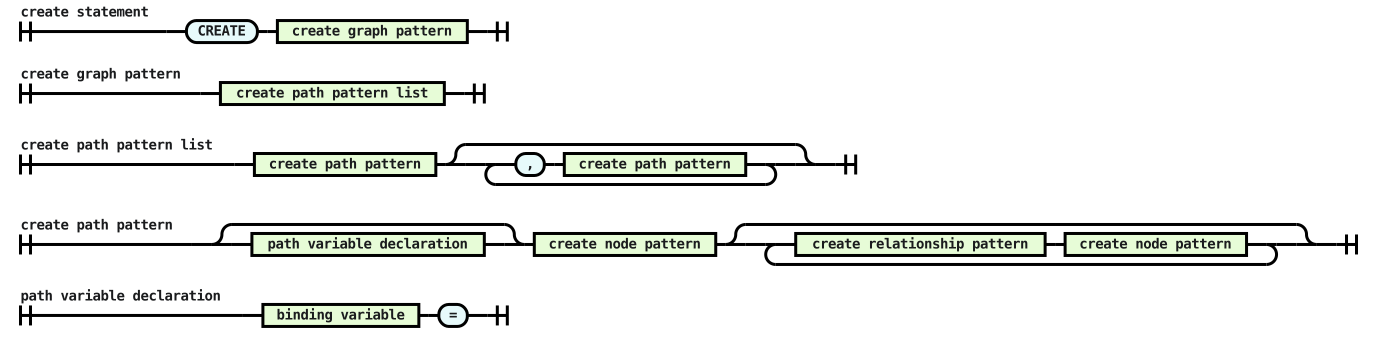
<create statement> ::= "CREATE" <create graph pattern>
<create graph pattern> ::= <create path pattern list>
<create path pattern list> ::= <create path pattern> [{ "," <create path pattern> }...]
<create path pattern> ::= [ <path variable declaration> ] <create node pattern> [{ <create relationship pattern> <create node pattern> }...]
<path variable declaration> ::= <binding variable> "="
Railroad diagram of the snippet